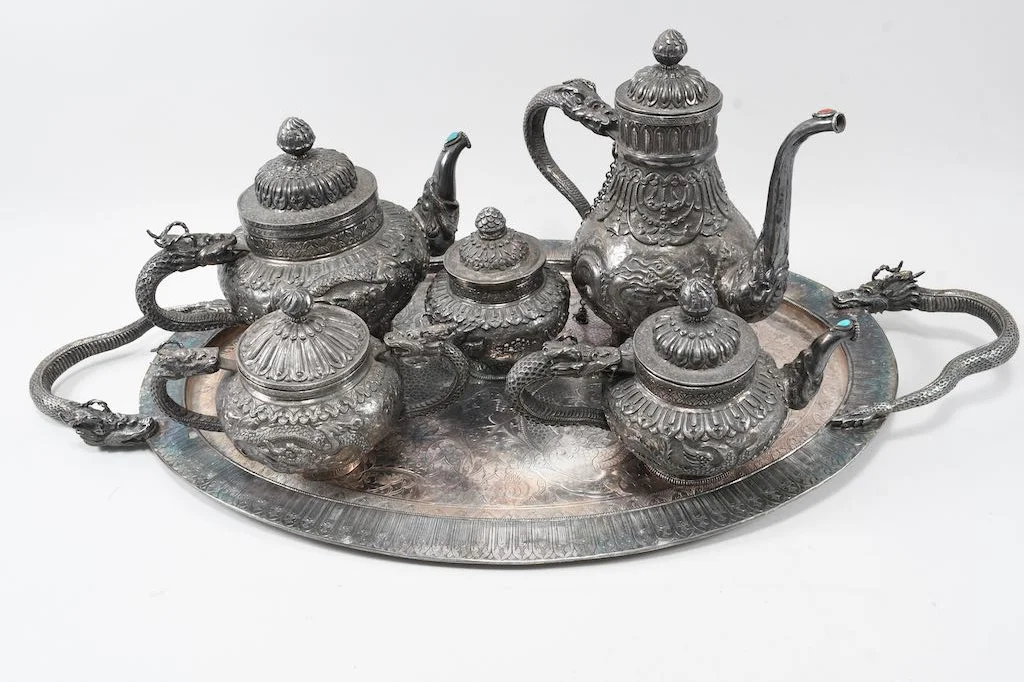
Silver service with dragons, c. 1900
Kolb Antik
Silver service with dragons, c. 1900Silver service with…sold for €6,716
Help

Signing in and registering

How do I sign in?

The portal does not need a password.

  1. Enter your email address and choose “Send sign-in link”.
  2. Open the email and tap the link.
  3. Choose “Sign in now”.

The link is valid for 60 minutes and can be used once. You can open it on any device. Emails from Kolb Antik often also contain a link to sign in directly.

Didn’t this help? Write to us

The sign-in link does not arrive or is no longer valid. What can I do?

First check your spam folder. If no email arrives within five minutes, choose “Send a new link”. Each link we have sent you is valid for 60 minutes. As soon as you sign in with one, the others stop working. If you open an old link, the page tells you why it no longer works: it has expired, has already been used, or you signed in with a different one. Choose “Send a new link”, and we send a new one to the same address right away. If you see “Please give us a quick call”, your access is locked for your security; after a short call, we unlock it again. Also check that you use the same email address we have on file.

Didn’t this help? Write to us

How do I register, and what happens after that?

Enter your email address in the consignment portal and open the registration link. Enter your name, phone number, address, and customer type. A phone number is required; bank details are optional. Then read the contract and choose “Conclude with obligation to pay”. You can add your bank details later under “My details” or with “Complete your details”. We need your IBAN for a payout by bank transfer.

Didn’t this help? Write to us

My email address belongs to several customer accounts. How do I switch?

After you sign in, the portal asks: “Which customer account do you want to open?” Choose the customer account from the list. On your phone, you can switch later under “More” with “Switch account”. You can also open the consignment portal home page; the list is shown there again.

Didn’t this help? Write to us

Why do I have to agree to the terms, and how long do I stay signed in?

Before you first use the portal and after every change, we ask you to agree to the terms of the consignment portal. Check the box and choose “Agree and continue”. Without agreement you cannot use the portal; you will then receive your documents by email or on paper.

You stay signed in on your device for at least 14 days. Every visit extends this, up to 30 days after you sign in. “My details” shows the date. On a shared device, please choose “Sign out” when you are done.

Didn’t this help? Write to us

Trouble with the portal?